CadetQ

Ab Initio Pilots

Training Management & Intelligence System

Know where every cadet stands, from enrollment to licence.

One record for every cadet across visas and medicals, ground school, DGCA exams, flight training and licence conversion.

CadetQ Cadet Journeys dashboard showing batch-wise progress across five training phases
Live · Running programmes today
1,003cadets in training right now,
across five phases
Onboarding181
Ground & DGCA221
Flight training341
Licence conversion140
Licence issue120
40+Batches
3Countries
3FTOs
The challenge

Your cadet programme runs across multiple teams, different FTOs and a dozen spreadsheets.

Ground school results sit in one file. The FTO sends hours in another. Visas, medicals and licence paperwork are with different people. When leadership asks how a batch is doing, someone spends two days putting the answer together.

Today
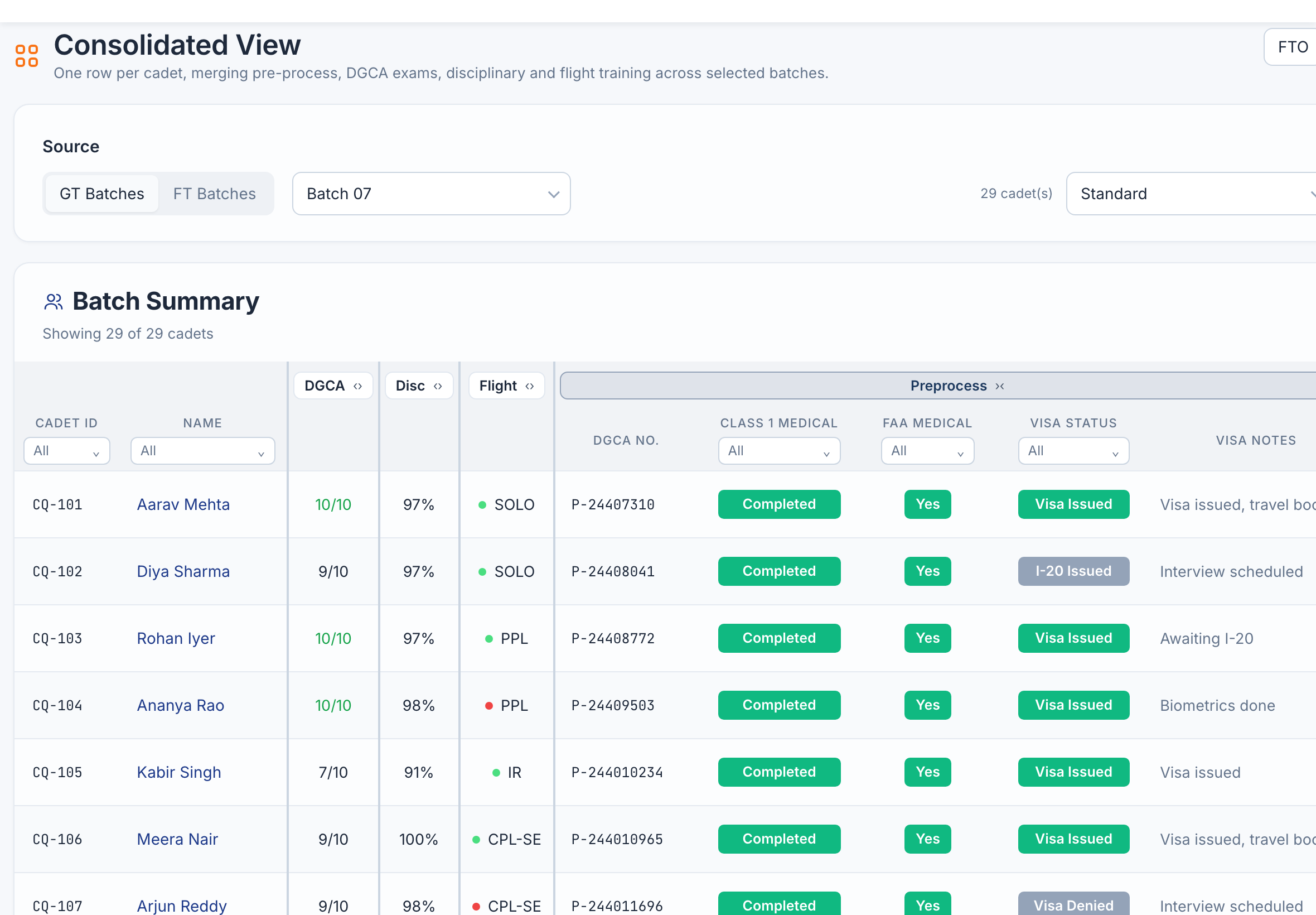
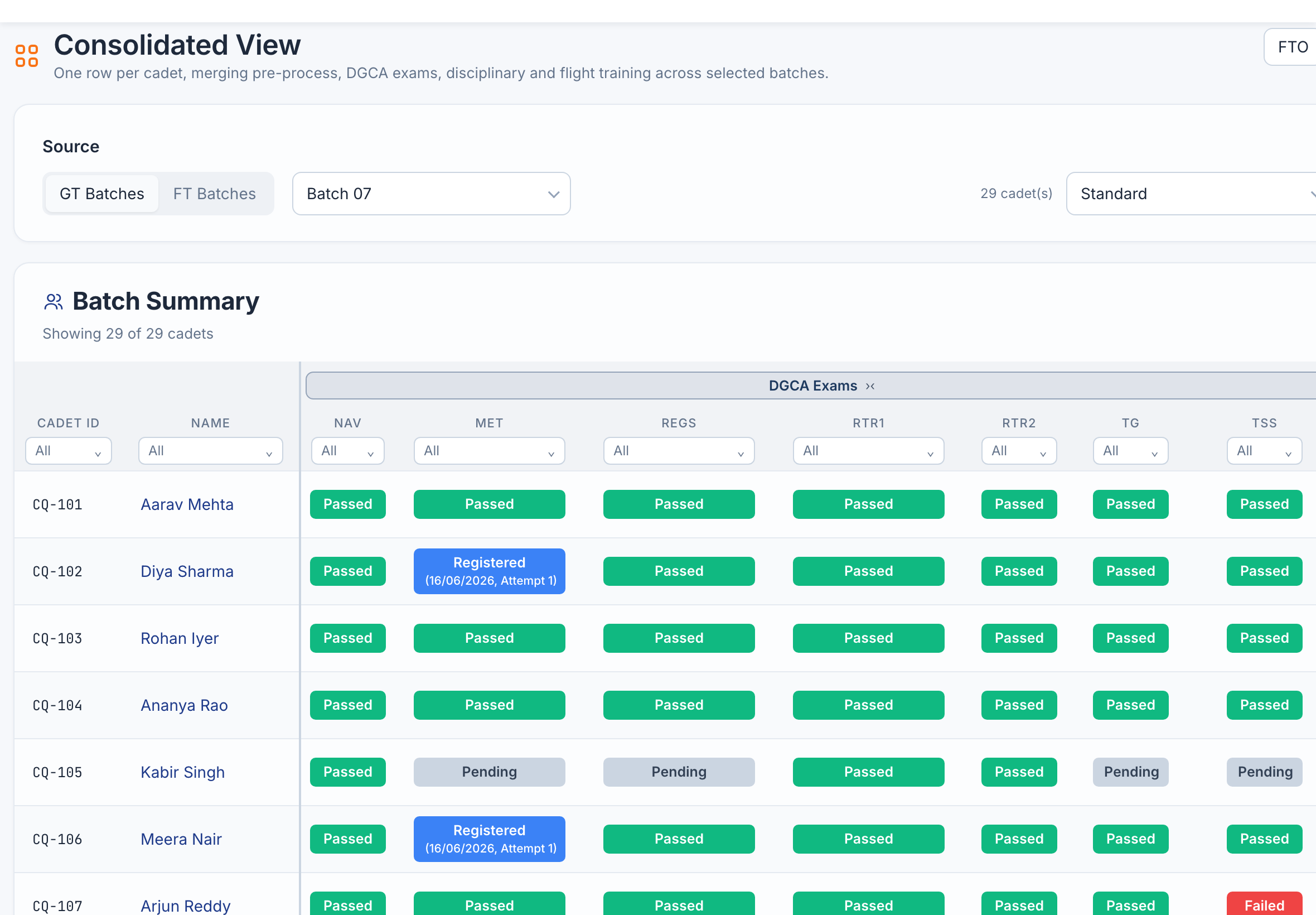
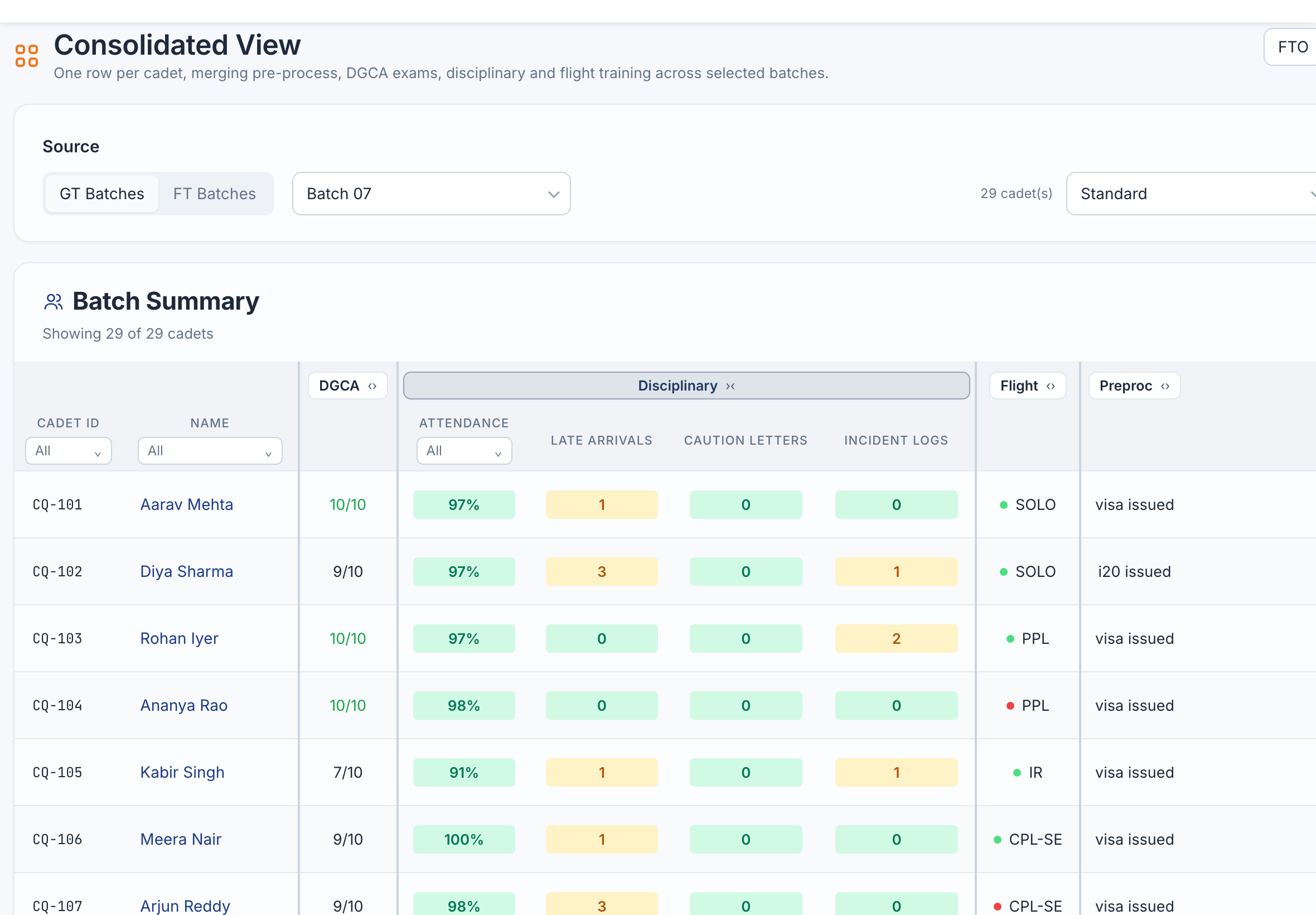
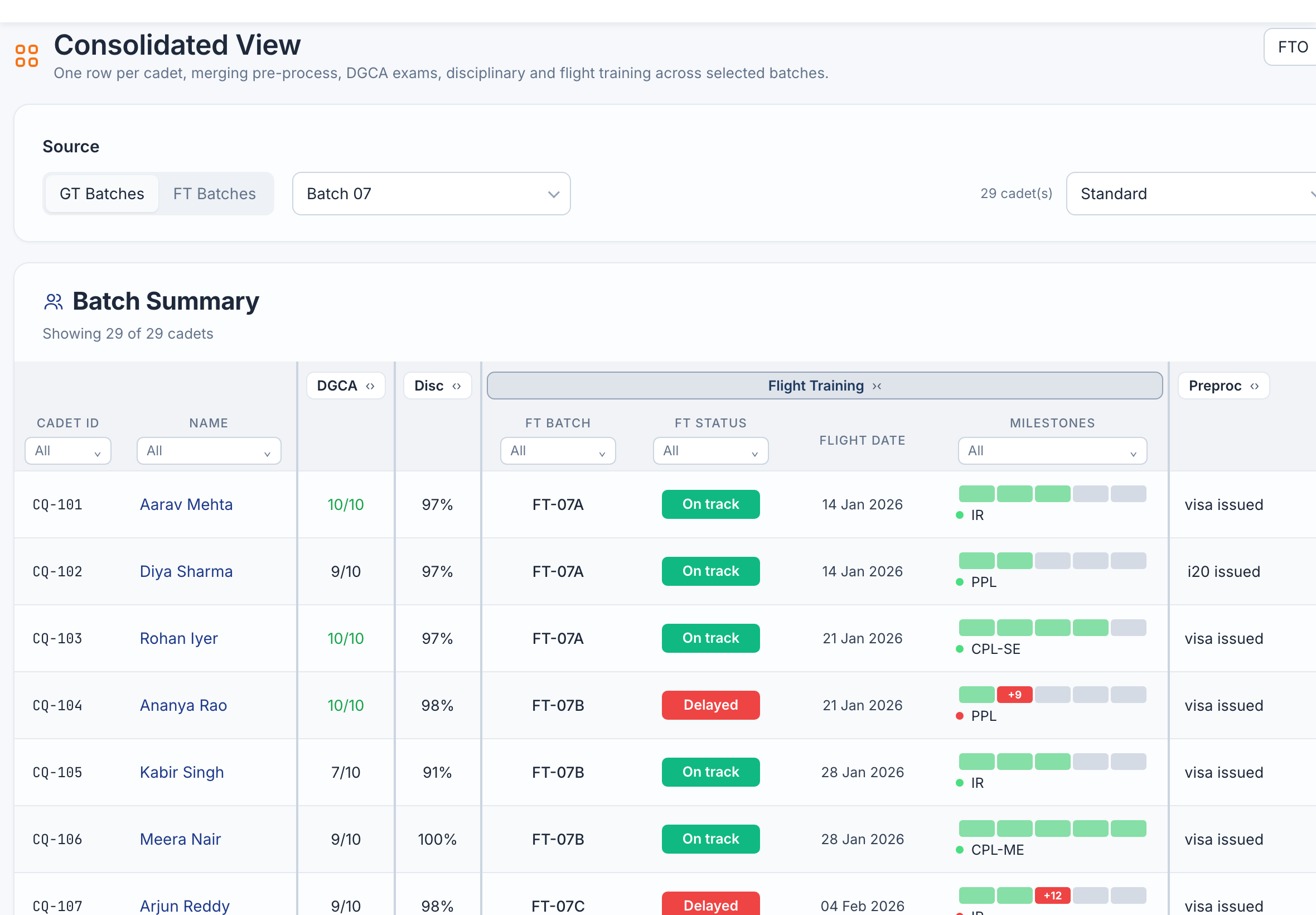
Consolidated View with the pre-process columns expanded
With CadetQ

Medicals, visa status and DGCA numbers for every cadet.

Drag the line to compare

Pre Process and Ground Theory: cadet-wise summary with model scores, attendance and departure status Flight Training: each cadet's stage, hours, weekly average, milestones and logged delays
Ground training · every cadet's scores, attendance and readiness to fly
One programme view

One programme. Many teams.
A clear view.

CadetQ brings ground school, flight training, documents and licence conversion into one record. Start with the whole programme, then open any batch and see the cadets behind the numbers.

Where is each cohort?

Batch and cadet progress across the training lifecycle.

What needs attention?

Benchmarks, milestone exceptions and recorded delay reasons.

What's next for each cadet?

Exam status, documents and the steps before the next handover.

The pipeline

Each phase benchmarked,
tracked & forecast.

Set the expected hours and days for each milestone. CadetQ shows who is on pace and who has fallen behind.

01

Onboarding & Clearances

Enrollment, medicals, documentation, visas

Planned 60 daysActual 54
Completed · 6 days early
02

Ground School & DGCA Exams

Papers, attempts, resits, RTR(A)

Planned 150 daysActual 158
Completed · 8 days over
03

Flight Training

Hours, stages, checkrides

Planned 200 hrsLogged 121
In progress · on pace
04

Documentation & Submission

Logbook verification, validities, filings

Planned 30 daysForecast 32
Forecast
05

Licence Conversion & Issue

Conversion, licence application, issue

Planned 75 daysForecast 75
Forecast
Delays & manpower planning

Every late cadet is a gap in your manpower plan.
Catch the slip where it starts.

CadetQ flags cadets running over their benchmark at each stage, records the cause (weather, aircraft, instructor availability or the cadet), and keeps the follow-up on record until they're back on plan.

Stop discovering delays. Start managing them.

Most programmes find out a cadet is behind at the end of a phase, when the time is already lost. CadetQ compares hours and days with your benchmark as flights are logged, so the slip shows up the week it happens.

  • Planned vs logged hours at every milestone, with variance bands
  • Cadets over benchmark, flagged automatically

Every delay has a cause. Now it has an owner.

Weather, aircraft, instructor or cadet, on record and followed up until they're back on plan.

  • Delay categories on every over-benchmark flight
  • Notes, review status and full delay history
Ground school delay analysis: on track, at risk and delayed counts, the DGCA exam milestone schedule and cadets needing attention with their risk indicator and delay attribution Flight training milestone progression: planned versus logged hours per stage, with the PPL stage 14.5 hours over benchmark and a weather delay logged Flight training delay reports: totals, logged delays with cause and review status, and delays still missing a reason Post-process workflow: days at each step against its target, with overdue steps flagged
Ground school · a dedicated delay analysis for every batch
Tests summary: DGCA paper status, marks and attempts for every cadet, with weekly test averages and attendance Flight training batch overview: hours flown by month against benchmark and milestone completion Cadet curriculum: missions by stage, the most repeated mission and its flight logs
Ground training · every DGCA paper, mark and attempt
Cadet performance

See the performance behind the progress.

A completed phase tells part of the story. Look closer at the academic and flying records that explain each cadet's progress.

  • DGCA examsSubject status, attempts, marks and marksheets.
  • Weekly tests & attendanceWeekly-test scores and attendance records.
  • Batch flight hoursBatch flight-hour trends and milestone completion.
  • Curriculum & flight logsCadet curriculum, repeated missions and detailed flight logs.
Handovers & documents

No cadet stuck between teams.

Each move from one team to the next comes with paperwork. CadetQ tracks FTO onboarding, CPL and FRTOL checklists, conversion flying, licences and medical validities, so the next team knows exactly what's outstanding.

  • FTO onboardingSubmissions, review status and cadet summaries.
  • CPL & FRTOL document checklistsShortfalls and resubmissions, document by document.
  • Conversion flyingRecency calculator, workflow and checklist.
  • Licences & medicalsIssue and validity dates, flagged before they lapse.
FTO onboarding: the batch submission checklist sent to the flight training organisation, with each cadet's review status One cadet's post-process timeline: every task against its benchmark day, with actual date, variance, owner and status The cadet's CPL documents for the DGCA submission, each approved, awaiting review, short or pending upload Licences and medicals for a batch, with validity dates and expiring or expired items flagged
FTO onboarding · everything the FTO needs before a cadet starts flying
For leadership

Every FTO you train with, measured the same way.

Cadets at different providers, tracked against the same benchmarks. See which FTO is on pace and which is slipping, and take the evidence into your next contract review.

Provider scorecard

CPL Integrated · cadets currently in flight trainingAirline view · all FTOs
FTO 1Arizona, USA · 42 cadets
Ahead of plan
Cadets on pace93%
Avg flying per cadet / week6.4h
Avg days over benchmark6 days
Top delay cause Weather
FTO 2Florida, USA · 36 cadets
On pace
Cadets on pace86%
Avg flying per cadet / week5.8h
Avg days over benchmark11 days
Top delay cause Instructor availability
FTO 3Bhopal, India · 28 cadets
Slipping
Cadets on pace68%
Avg flying per cadet / week4.6h
Avg days over benchmark24 days
Top delay cause Aircraft maintenance
  • Airline viewEvery provider and every batch in one place, for the people who own the programme.
  • Provider-level accessEach FTO sees and updates only its own cadets.
  • Batch comparisonThe same metrics across providers, ready for a contract review.
Reports: cadet and batch performance, delay, manpower planning and termination reports, with batch, cadet and period options Cadet and batch performance report: headline KPIs and each cadet's phase, scores, flying rate and status Delay report: hours lost by cause and by phase, and the open delays with owner and status Manpower planning report: first officers ready for induction per quarter, plan versus forecast, and induction month by batch
Reports · pick the report, the batches and the period
Reports

Walk into every review with the answers ready.

Take the relevant records into the next review. Select your batches and cadets, then use the reporting and export tools already in the programme workspace.

  • Cadet & batch performanceScores, progress and status by cadet and by batch.
  • Delay reportHours lost by cause, phase and FTO, with every open delay.
  • Manpower planning reportFirst officers ready for induction, plan vs forecast.
  • Termination reports & morePlus DGCA exams, weekly tests and consolidated scores, in Excel or PDF.
One shared record

Every team works in the same record.

Each team gets its own workspace. Updates go straight into the cadet's record, and flight records sync live from your FTO's software, so nobody has to chase anyone for a spreadsheet.

Programme managersSet benchmarks and see every batch.
OperationsSchedules, process notes and follow-ups.
Visa teamI-20 to visa issue, step by step.
InstructorsAttendance, ratings and remarks.
CadetsTheir own progress and document uploads.
Comms Room: one cadet's conversation across the Flight Ops, Ground Ops and Common rooms, with a needs-attention flag, mentions and a to-do created from a message A cadet's flight log synced live from the FTO's software, with the newest flights marked as just synced To-dos for each team, linked to the cadet and the conversation they came from, next to a shared weekly calendar
Comms Room · every conversation about a cadet, next to the cadet's record
Teams and access: each person at an FTO, their teams and the batches they can access Access by batch: which teams and people at the FTO can access each batch Audit log: every change to a record, with timestamp, user, action, record and IP address Audit log details for one change, showing the previous data and the new data
Who has access · each person at the FTO and their batches
Trust & governance

The right access for every team. Records that hold up in an audit.

Every change is logged with who made it, when, and the value before. Access is set by role and by batch, so each team and each FTO sees only what it should.

  • Full audit trailEvery change to a record: who, when, and the data before and after.
  • Role-based permissionsEach role sees and changes only the modules it needs.
  • FTO teams & batch accessWho at each FTO can access which batch, by person or by team.
  • Private & shared roomsFTO and internal teams each have a private room, plus a shared one.
  • Secure document storageEvery cadet's documents in their own controlled folder.
Getting started

Start from the trackers you already have.

We bring in your existing batch and cadet spreadsheets, then set up your phases, benchmarks, FTOs and teams with you.

Import your trackers

We bring in the batch and cadet spreadsheets you already keep.

Set your benchmarks

Planned days and hours for every phase, agreed with your team.

Invite your teams

Programme office, ops, visa and each FTO, each with the right access.

We used to spend the first week of every month reconciling FTO spreadsheets. Now our programme review starts with the answers already on screen.Capt. A. Sharma · Head of Cadet Training, Partner Airline
Sample quote
Next step

Run your entire cadet programme from one platform.

In a short briefing, we map your phases, FTOs and reporting to CadetQ and show it with a programme set up like yours.